

EMCO Remote Installer
This remote installer tool allows you to perform remote installation and uninstallation of EXE setups and MSI/MSP packages, and to audit installed software.

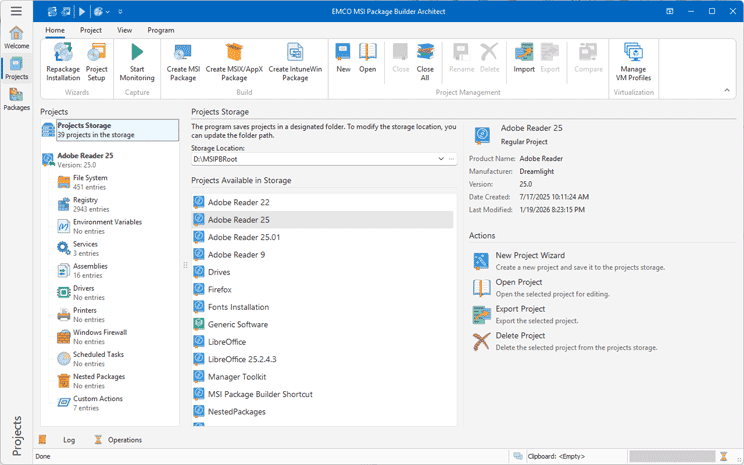
EMCO MSI Package Builder is a visual MSI builder that allows creating silent MSI packages ready for remote deployment. You can create an MSI package manually from scratch using an intuitive visual installation editor or utilize the file system and registry changes capturing technology in order to create an MSI project and build MSI automatically. You don't need to have any special knowledge or take training in order to use the application since all operations are automated.

EMCO MSI Package Builder is a tool for IT professionals who need to create MSI packages and repackage legacy installations into the MSI format so as to prepare them for unattended remote deployment over the network.
It's really easy to create MSI packages using EMCO MSI Package Builder even for people who don't have any experience with installation authoring tools. In order to build an MSI, you don't need to learn MSI specification or take training. Instead, simply define what your installation should do in terms of file system, registry and other changes using the intuitive interface and get an MSI package that would implement your ideas.
Use the visual MSI editor to create an MSI installation project manually. You have to define the resources included into the installation and the operations that should be performed with these resources in the scope of the installation process. Once the installation project is configured through the visual editor, you can build an MSI package.
Create an MSI installation project automatically using the changes capturing technology. This technology is designed to detect file system and registry changes and can be used to track changes made by any running process or third-party installation. It provides you with an installation project ready for MSI generation.
Regardless of the way you created an MSI installation project, you can edit it through the visual editor before you generate an MSI file. The application allows decompiling third-party MSI packages, and you can also modify them, if required. You can change file system, registry and service entries in the MSI using the visual MSI editor.
Using the visual MSI editor, you can manage installation resources very easily. The application supports various types of operations involving resources, including resources addition and deletion, changing file attributes, setting permanence options for a file or registry resources, and other actions, which can be managed through the MSI editor.
The program is available in three editions with the different set of the features.
Compare Editions
The Professional Edition supports both manual MSI creation through a visual MSI editor and automatic MSI creation using installation monitoring. It can be used to create MSI packages, convert EXE installations into MSI, and modify existing MSI packages.
The Enterprise Edition extends packaging capabilities. It supports both manual and automatic MSI creation, but also enables packaging of complex installations that deploy services, drivers, and other advanced resources. It additionally supports MSIX/AppX package creation and wrapping installations into MSI for deployment.
The Architect Edition includes all available packaging capabilities. It supports creating MSI and MSIX/AppX packages manually or automatically and repackaging installations of any complexity, including those that deploy services and drivers. It can wrap silent installations into MSI and IntuneWin packages. It also provides Intune integration for publishing packages directly to Intune.